From individual orders to preparation totals
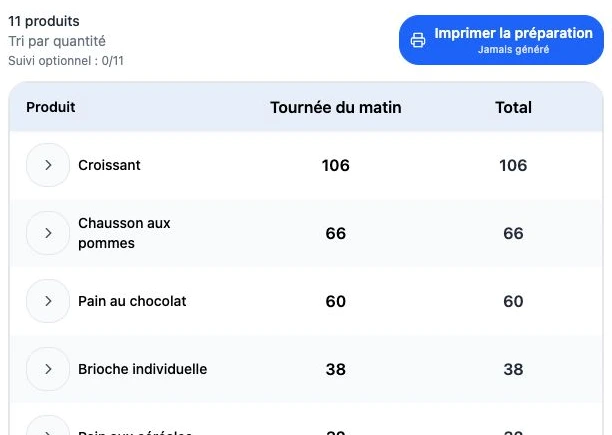
Adding up several emails by hand makes the start of a working day harder. ArtisFlow brings requirements into a preparation view: the team finds products and quantities, followed by the relevant order detail. Pieces and kilograms remain distinct units.
From product totals to each customer’s package
An overall quantity helps preparation; it is not enough to allocate products. Customer detail follows packing. Teams can track preparation and packing to identify orders ready for handover.
Options in the language of your trade
Depending on your business, the preparation option can read “Sliced”, “Gift wrapping”, “Individual packaging”, “Bagged packaging” or “Vacuum packing”. Enable it on eligible products. Instructions stay with the order; the catalogue should specify the formats you offer.
A delivery note for handover
The printable document accompanies the products and quantities in the order. Your logo, contact details and document wording reflect your business identity. The note supports handover and information transfer to accounting; selling prices and customer discounts are not displayed.
Separate responsibilities
Administrators organise data and access. Bakers, pastry chefs or preparation managers follow their team’s work. Drivers see information relevant to their rounds. Food-safety procedures, regulatory traceability and invoicing remain in your dedicated tools and procedures.
Three questions, three views
A total does not replace customer detail.
- Product view
- How much to prepare today? Quantities are grouped by product with their own unit.
- Customer view
- Who receives each product? Packing retains order quantities, options and instructions.
- Document
- What goes with the goods and to accounting? A delivery note without prices accompanies the products.
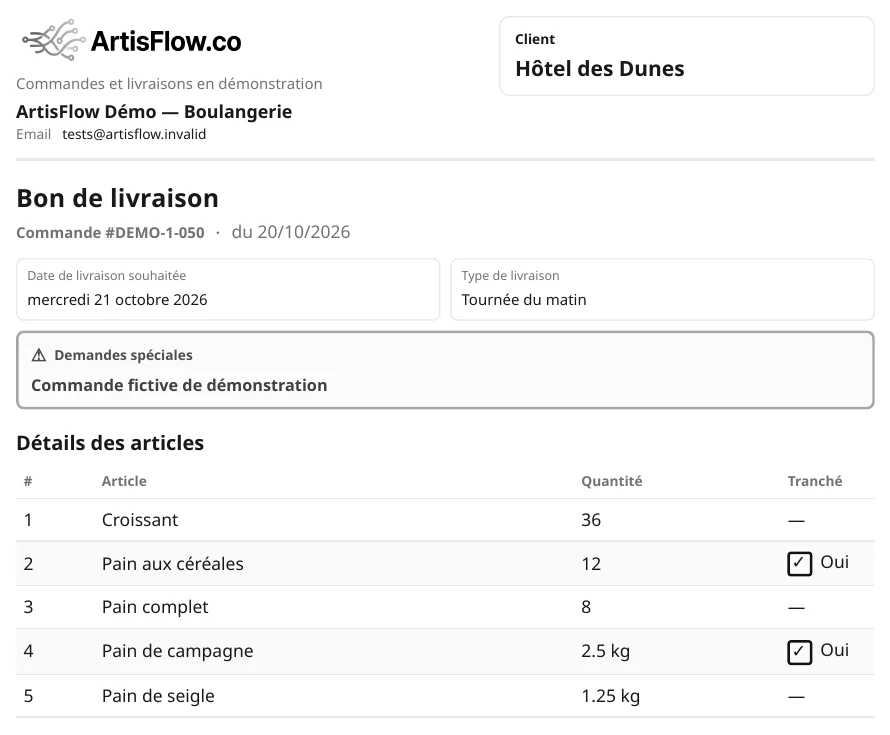
If quantities differ, the manager checks the order and information needed by accounting. Actual weights, substitutions and partial handovers are checked against your examples during the demo.