Feature

Frequent products or standing orders: the right rhythm for each customer.

→

Regular selections when quantities change; standing orders when requirements are stable. Two distinct answers to repetitive B2B purchasing.

Frequent products · The B2B habit

The same products. Only the quantities change.

A hotel comes back to its croissants and bread. A wine merchant to a few wines. For daily ordering, customers first see their regular products: often 3 to 5, rarely more. They adjust quantities instead of browsing your whole catalogue.

Our field observation: around 95%

of B2B customers return to the same products for their usual orders. A field observation behind the ArtisFlow ordering experience.

  • A list specific to each customer, with usual quantities.
  • The full catalogue remains available for occasional needs.
  • The customer confirms each order and its delivery date.
Frequent products or standing orders? →
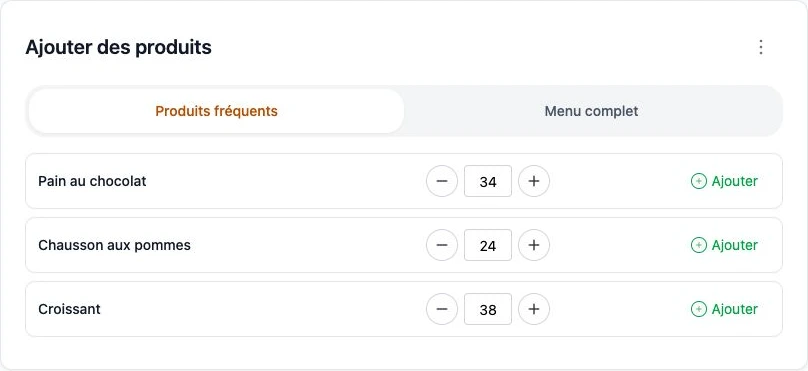
Actual Frequent products screen: 34 pains au chocolat, 24 apple turnovers and 38 croissants; the full catalogue remains accessible
Actual bakery demo screen · Three products for the fictional Épicerie du Marché customer · French interface.

The problem: entering the same products every day

A hotel often orders the same bread; a restaurant the same fresh products. Browsing the full catalogue again takes time. Yet recurring habits do not always mean automatic ordering: occupancy or service changes the quantities.

Frequent products: the customer stays in control

The portal presents a customer’s regular products first, with usual quantities. They adjust them, choose a date and confirm each order. The full catalogue remains available for additional requirements.

Standing orders: a defined requirement on selected days

A standing order records products, quantities, options and weekdays for stable requirements. Activation and generation rules are checked with you: this mechanism is separate from a frequent-product list.

Exceptions remain decisions for your team

Closures, public holidays, absence or lasting changes: check calendars and rules before launch. A recurring template should not be treated as a guarantee that requirements are unchanged. Editing deadlines still apply.

An example to check in the demo

For a hotel, compare a morning needing 18 croissants with one needing 42: frequent products let the customer confirm a variable quantity. For fixed quantities on selected days, examine standing orders. Test a closure and a quantity change before wider rollout.

Setup and responsibilities →

Explore the workflow for your industry, then compare plans.

Industries →Plans →

The order stays visible as teams change

Who ordered? What happens next? Everyone stays in the loop.

One customer, several users

The owner, reception staff, managers and different shifts each have named access. Linked to the same customer, they place and review its orders according to their permissions. The next shift finds what has already been ordered.

Automatic order emails

After an order is created, the customer’s users receive email updates. Edits, cancellation and successful delivery — or dispatch in the enabled workflow — trigger configured notifications. Follow-up does not rely on the person who placed the order.

A detailed history for each order

Who created the order, when and with which products? Who changed a quantity, completed preparation, packed and delivered it? The log retains users, dates, changes and workflow events.

Emails can reach all users linked to the customer, not only the order’s author, according to enabled recipients and preferences. Log access follows each role’s permissions.

Your next step · A demonstration adapted to your trade

A demonstration built around your working day.
Your catalogue, customers and organisation set the starting point for the demonstration.

Start with your working day

Let’s look at your next day of orders.

A demonstration of your workflow, from catalogue to delivery note.

  1. 01Your catalogue
  2. 02Your preparation
  3. 03Your deliveries
Request a demo

14-day trial · Technical administration included