Find where orders get lost
For one week, record channels, missing information and follow-up work. An order received on a personal phone at lunchtime may never reach the shared notebook. The first problem is the lack of a shared record and a clear owner.
Define the essentials before choosing software
An actionable order identifies the customer, products, quantities with units, requested date and handover method. Add preparation options and useful instructions. Then decide who may edit the information and until what time.
Offer one shared entry point
Invite a few regular customers to start using their portal. Show their usual products and how to find order history. Keep an explicit process for remaining phone orders: one person records them in the system and checks the details.
Separate orders from notifications
A message announcing order acceptance or delivery is a notification. Reading free-form messages, identifying a customer and creating an order is a different capability requiring an integration, controls and appropriate validation. In ArtisFlow, that connection is a separate Enterprise project, with workflow validation before activation.
Measure the change
Compare re-entry time, missing details, corrections after the cutoff and the share of customer-entered orders. Start with a limited scope, then expand when staff and customers can find their orders without help. An ArtisFlow demonstration lets you explore this workflow using your own examples.
Use with your team
Five decisions for the transition.
- Name one person to record requests received outside the portal.
- Choose two or three customers and a few regular products.
- Check customer, date, unit, quantity and handover for every request.
- Apply the same cutoff across all channels.
- Check unconfirmed requests each day before preparation.
Example: an order received by phone
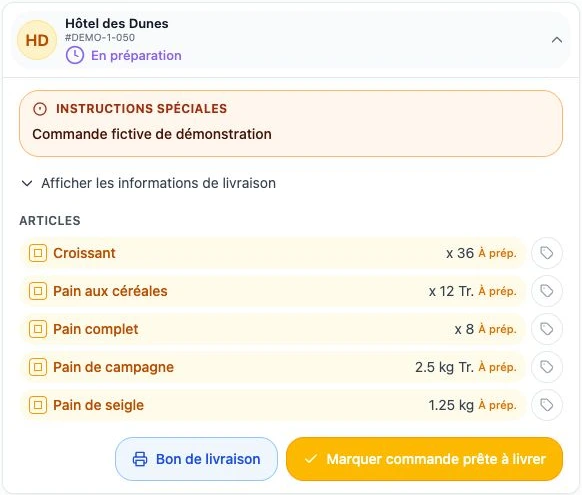
A restaurant calls for 36 croissants tomorrow morning. The manager confirms the business, date and round, records the request using the agreed access, then checks it appears on the relevant day. A second message from the customer needs checking as a possible edit, rather than being treated as another order.
Invitation wording to adapt
For your next orders, use your ordering space to find our products, delivery dates and order progress. We will send your access separately. If you need help, contact your usual business contact. Changes after the cutoff need their confirmation.