Practical guide

Trial a B2B portal with your customers before wider rollout.

↗

Choose a small group, check one complete order and measure avoided work before changing your whole organisation.

The problem: changing tools can create extra work

A portal helps only when customers and staff can use it in their actual working day. Preparing every product and account before checking the first workflow can multiply corrections.

Choose a representative scope

Start with a few customers with different habits, one round and products by piece or weight. Include someone placing orders and a colleague checking progress. Agree the start date of the 14-day trial.

Define one place where an order is confirmed

Calls can remain possible during the transition. Staff record and check the request in the agreed workflow, avoiding counting a message and an order as two requirements. Communicate cutoffs and the urgent-request process.

Test exceptions before wider rollout

Edit a quantity before the cutoff, check packaging, prepare a note without prices and confirm handover. Also test a delay or unavailable product with the manager: everyone should understand more than the ideal case.

Decide using simple observations

Record time spent reconstructing orders, calls to clarify quantities and preparation discrepancies. Check that customers can order independently and staff can find changes. Then agree the next scope, outstanding work and service arrangements.
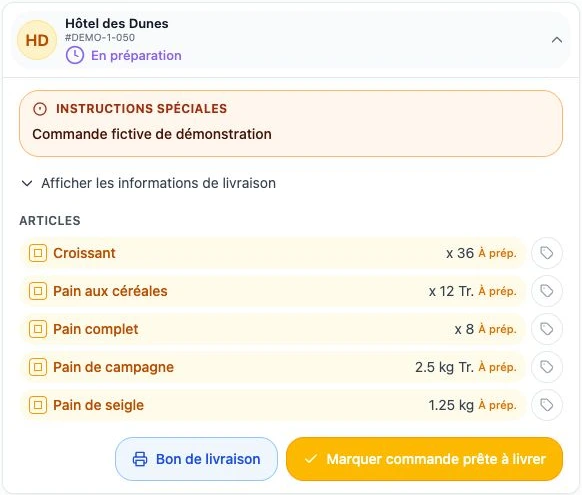

Actual ArtisFlow demo screenshot — Trial a B2B portal with your customers before wider rollout.
ArtisFlow bakery demo workflow · Fictional data · French interface.

Setup and responsibilities →

Explore the workflow for your industry, then compare plans.

Industries →Plans →

Your 14-day trial

Test your working day, not just the buttons.

Choose a few customers, one round and a representative day. These four checks help you decide whether the portal actually simplifies your workflow.

  1. 01

    Customers can order independently

    They find 1–3 regular products, choose a date and confirm without asking where to click.

  2. 02

    Preparation avoids re-entry

    Staff find totals and customer allocation. A test edit remains easy to understand.

  3. 03

    Handover closes the loop

    Drivers find their list and confirm a handover; the team finds the status, history and configured email.

  4. 04

    The gain is observable

    Compare time spent reconstructing messages, requests needing clarification and preparation discrepancies against your starting point.

These are validation criteria to agree with you, not a quantified savings promise.

Your next step · A demonstration adapted to your trade

A demonstration built around your working day.
Your catalogue, customers and organisation set the starting point for the demonstration.

Start with your working day

Let’s look at your next day of orders.

A demonstration of your workflow, from catalogue to delivery note.

  1. 01Your catalogue
  2. 02Your preparation
  3. 03Your deliveries
Request a demo

14-day trial · Technical administration included